
Log a receipt after checkout
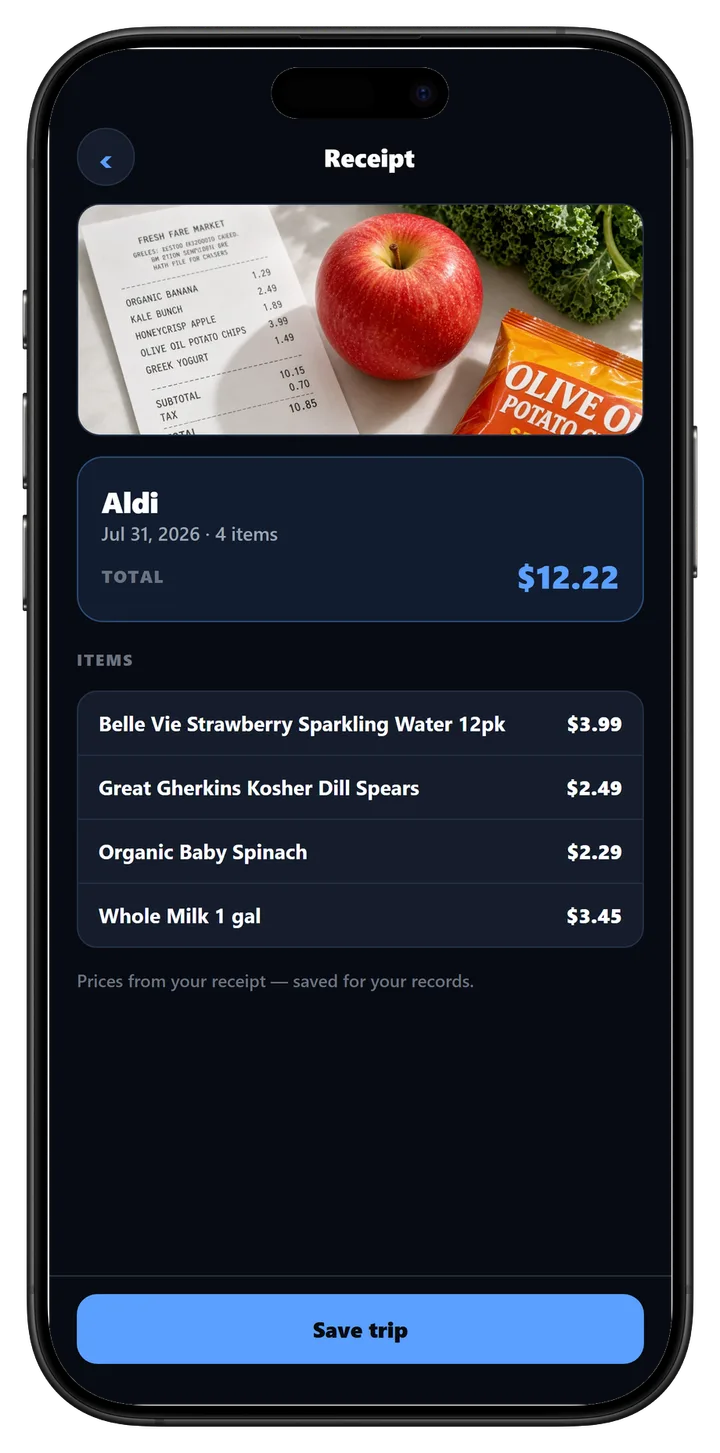
Checkout is done. The bag is in the car. The open question is whether that trip disappears into a crumpled strip of paper, or whether you can open it later when you want the store, the lines, and the total in one place.
WorthIt can start that from one photo of the receipt.
What to photograph
Open WorthIt and snap the receipt. Keep the whole strip in the frame when you can — store name at the top, line items in the middle, total near the bottom. A crease that covers the total, or a corner cut off the store name, makes the read weaker.
This is a receipt check, not a shelf scan. You are logging what you already paid, not deciding whether to buy.
What you get back
WorthIt reads the trip and shows:
- The store name and the date it could pull from the print.
- Each line with the price from that receipt.
- The trip total.
Those prices are from the paper you photographed. They are not live aisle comps and they are not a second guess of what the register charged.
Save the trip, then use it
Tap Save trip when the lines look right. The receipt lands in Activity so you can open it again later.
From there you have two useful paths:
- Tap a line to run a Save check on that item if you want to know how the paid price compares later. That uses one analysis from today’s allowance.
- Add the lines to a grocery list when you want those staples on the next trip compare.
You do not need both. Saving the trip is enough the first time.
When a receipt scan helps
Use it after a shop you want to remember — a weekly run, a stop you might return to, or a total you want next to next week’s list. Skip it when you only care about the shelf price before the item goes in the cart. That is still a Save photo of the tag.
One clear receipt at the end of the trip is enough. You are not photographing every bag.
Download WorthIt free on iPhone and try a receipt the next time you leave the store.
Free to download · No credit card needed